AquaGuide™ Smart Surgical Assistant
One AI Platform for the Entire Neurosurgical Journey
AquaGuide™ supports neurosurgeons before, during, and after surgery — simulating procedures in the planning phase, providing contactless image control in the sterile operating room, and tracking patient outcomes after treatment.
The Full Journey
Designed Around the Surgeon. Built on AI.
AquaGuide™ addresses the most persistent challenges of modern neurosurgery: sterile access to imaging in the OR without touching keyboards or mice, planning with complex fMRI / DTI / MRI data, and measuring how a tumor responds over time. One integrated system covers it all.
AquaGuide Plan
Preoperative — simulates the surgical process and generates optimized surgical plans with AI-assisted image analysis.
AquaGuide OR
Intraoperative — delivers multi-modality imaging and AI insights to the surgeon in the OR — controlled entirely by voice and gesture.
AquaGuide Follow-up
Postoperative — automatically evaluates post-operative CT and MRI scans to measure tumor size changes over the recovery period.
AquaGuide Plan
Simulate the Surgery Before Entering the OR
AquaGuide simulates the surgical process during the treatment design stage. The surgeon can rehearse the procedure on a patient-specific 3D model, explore different approaches, and compare scenarios before making a decision.
- Automatic tumor detection — identifies and outlines the tumor on patient scans
- DTI analysis — maps white-matter fiber tracts to reveal critical neural pathways
- fMRI analysis — identifies functional brain regions that must be protected
- Surgical plan generation — proposes optimized plans based on the location, depth, and surrounding anatomy of the lesion
- Brain biopsy planning — 3D reconstruction, safest needle trajectory, stereotactic coordinates, and automatic risk-zone warnings
AquaGuide OR
Your Images. Your Commands. Zero Contact.
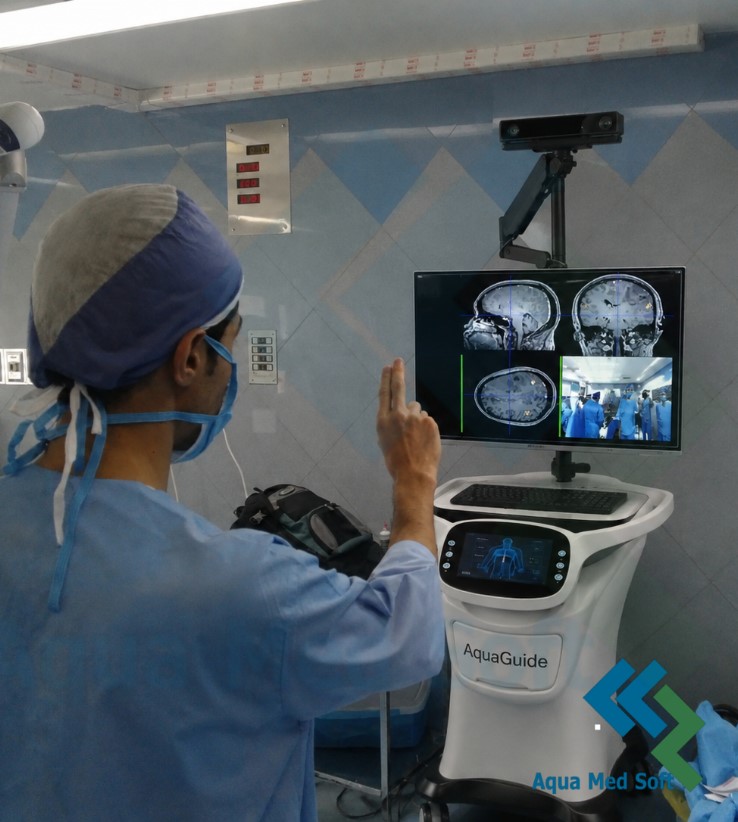
Inside the sterile field, a surgeon cannot touch a keyboard or mouse. AquaGuide solves this with natural, contactless interaction — voice commands and a defined set of hand gestures control every core function.
- Multi-modality display — MRI, fMRI, DTI, and tumor images side by side in 2D and interactive 3D
- Voice & gesture control — scroll, rotate, zoom, and switch views hands-free; sterility fully preserved
- AI insight in real time — LLM + RAG answers from authoritative reference literature and documented surgical reports
- Seamless hospital integration — direct DICOM/PACS connectivity, on-premise operation, no cloud dependency
AquaGuide Follow-up
The Journey Continues After the OR
Treatment doesn’t end when the surgery does. AquaGuide automatically evaluates the patient’s post-operative CT and MRI scans and measures tumor size changes — quantifying whether the tumor has shrunk or grown.
- Objective, measurable treatment outcomes
- Early detection of tumor recurrence
- Data that feeds back into planning for the next procedure
- A complete, documented care loop for every patient
[IMG — AquaGuide Follow-up: before/after scan comparison with tumor measurement]
Hardware
Purpose-Built for the Operating Room
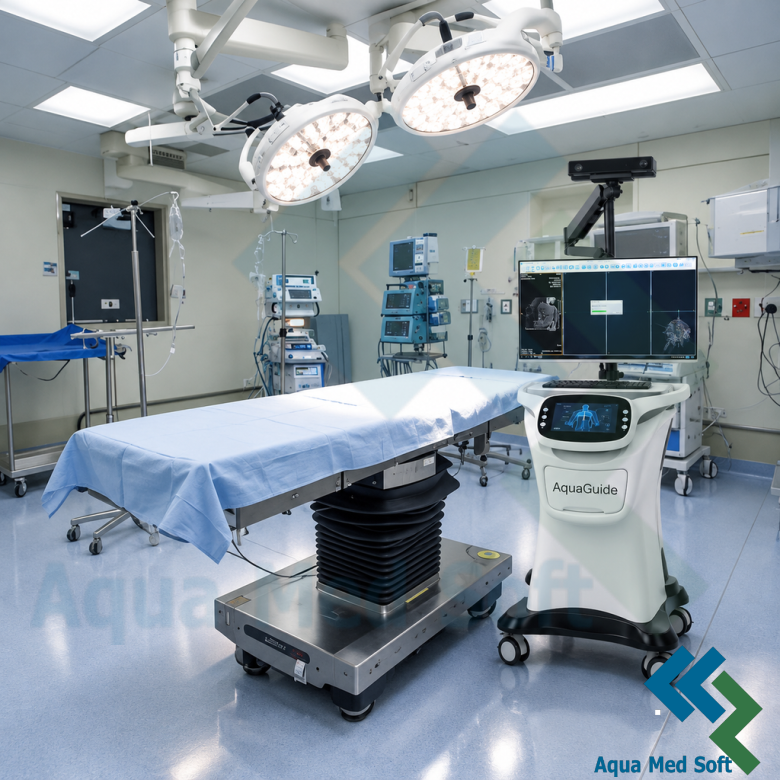
A dedicated medical cart integrates every component of the system into one ergonomic, sterile-friendly unit:
- Motion sensor (Kinect) for gesture recognition
- Calibrated microphone for voice commands
- Adjustable monitor positioned for the surgeon
- Central processing unit running the AquaGuide software
- Emergency power switch and protective electrical circuit
- Lockable wheels for stable positioning
- Hospital network connectivity for fast, secure data transfer
Feature Grid
Everything the Surgeon Needs, One System
- Multi-source medical imaging — MRI, fMRI, DTI, and tumor data in 2D and 3D
- AI-driven automatic analysis — tumor detection, tract mapping, and functional mapping
- Interactive viewing — cutting, rotation, and side-by-side comparison
- Professional editing tools — brightness, contrast, annotations, rulers, and measurements
- Contactless control — voice and gesture commands for every core function
- PACS/DICOM integration — direct retrieval of studies from the hospital network
- 3D structure simulation — vessels, nerve fibers, and surrounding tissue rendered around the tumor
- Training simulation mode — virtual practice with real patient data
Training Mode
Where Surgical Education Meets Real Data
Because AquaGuide simulates surgical conditions accurately, it is also a powerful teaching tool. Residents and trainees can practice full procedures virtually on real patient datasets, build a deeper understanding of anatomy and neural pathways, and bridge the gap between theory and practical skill before entering the OR.
Quality
Engineered to Medical Software Standards
- IEC 62304 — software development lifecycle processes for medical device software
- ISO 14971 — application of risk management to medical devices
- Zero-Trust security architecture — role-based access control, encrypted data at rest and in transit, immutable audit logs
AquaGuide is a decision-support tool: the final clinical decision always remains with the surgeon.
Roadmap
Continuously Evolving — Driven by Surgeons
- Real-time surgical navigation — instrument tracking fused with patient imaging in the OR
- Augmented and mixed reality — view and interact with the 3D brain model in the physical environment
- Expansion to further specialties — the same platform applied to spine, lung, and beyond
FAQ
Frequently Asked Questions
Which imaging modalities does AquaGuide support?
AquaGuide displays and analyzes MRI, fMRI, DTI, and CT data, received directly from the hospital PACS via standard DICOM protocols.
Does AquaGuide replace the surgeon’s judgment?
No. AquaGuide is a decision-support and visualization tool. The final clinical decision in every case remains with the surgeon.
How does contactless control work?
A motion sensor recognizes a defined set of hand gestures and a calibrated microphone processes voice commands. Both channels control every core function — scrolling, rotation, zoom, and view switching.
Does AquaGuide require an internet connection?
No. AquaGuide operates on-premise within the hospital network and has no cloud dependency.
Can residents and trainees use AquaGuide?
Yes. A dedicated training mode allows practice on real patient datasets in a virtual environment.
See AquaGuide in Your Surgical Workflow
Request a personalized demonstration and discover how AquaGuide™ can support your neurosurgical team — from planning to follow-up.
Request a Demo